

Core Temp is a compact, no fuss, small footprint, yet powerful program to monitor processor temperature and other vital information.
What makes Core Temp unique is the way it works. It is capable of displaying a temperature of each individual core of every processor in your system!
You can see temperature fluctuations in real time with varying workloads. Core Temp is also motherboard agnostic.
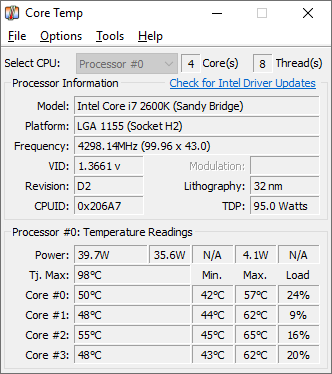
The uniqueness of it is that it shows the temperature of each individual core in each processor in your system! You can see in real time how the CPU temperature varies when you load your CPU. It’s also completely motherboard independent.
Intel and AMD recently published detailed, public information about the “DTS” (Digital Thermal Sensor), which provides much higher accuracy and more relevant temperature reading than the standard thermal diode sensors do.
This feature is supported on all Intel Core and Core 2 based processors as well as the whole AMD’s Athlon64 line of CPUs.
Note: AMD Phenom is supported, but it does not report absolute temperature.
Core Temp also has a logging feature, allowing a user to easily record the temperature of his processor(s) over any period of time, then the data can be easily transferred into an excel datasheet for easy graphing.
Core Temp works on Windows XP Service Pack 2, 2003 Server, Vista and Windows 7 (both 32bit and 64bit versions).
Thanks to CoolIT Systems for providing a digitally signed Core Temp driver which now works on all Vista and Windows 7 versions.
Version 1.19.5 – 19th October, 2025
– New: Support for Zen 4 AMD processors including ThreadRipper 7000 series, Raphael, Dragon Ridge, Genoa ES, Hawk Point, Phoenix
– New: Support for Zen 5 AMD processors including ThreadRipper 9000 series, Granite Ridge, Fire Range, Strix Halo, Strix Point, Krackan Point, Turin
– New: Per-CCD and per-core temperature readings for all generations of Zen based processors, most models supported
– New: TDP and TjMax detection on most Zen based processors
– New: Support for Intel processors including Sapphire Rapids, Emerald Rapids, Granite Rapids, Lunar Lake M, and preliminary Panther Lake
– New: Dark Mode (requires Windows 10 or newer OS)
– New: Effective core frequency readings + system tray icon
– New: Core select menu for frequency (right click the frequency fields)
– New: P-Core/E-Core tooltip indicators
– New: Folder selection for log file path
– New: Windows Event Log reporting for Overheat Protection events
– New: System Information dialog upgraded
– New: Average measurement field for temperatures
– Fix: BSOD on some newer AMD machines
– Fix: Vulnerabilities in driver and better restrict driver access
– Fix: Improve frequency detection accuracy on AMD processors by using a new algorithm
– Fix: Frequency detection on newer Intel processors
– Fix: Many other fixes for older AMD and Intel processors
– Fix: Window size on DPI, resolution and display changes
– Fix: Button sizes in the settings dialog in some languages
– Fix: UI glitches on older OSes
– Change: Make the look and feel of the UI on AMD processors to be the same as Intel
– Change: Both Tdie and Tctl readings are displayed on Zen 1 processors when applicable
– Change: Mini-Mode and TjMax adjust options removed
– Change: Modulation field replaced with Effective frequency
Download
Download the standalone version of Core Temp: 32 Bit 64 Bit
Language packs
[ Armenian | Bulgarian | Simplified Chinese | Traditional Chinese | Czech | Danish | Dutch | Finnish | French | German | Greek | Hebrew | Hungarian | Italian | Japanese | Korean | Norwegian | Polish | Portuguese | Romanian | Russian | Slovak | Spanish | Swedish | Turkish | Ukrainian | Vietnamese ]
[ Download the translation tool ]
