

DefenderUI Free/Pro is a, small, and extremely useful application created by VoodooShield. This handy program not only provides a user-friendly and efficient user interface for Microsoft Defender but also unlocks hidden Microsoft Defender security features that are otherwise unavailable to the end-user in Windows Security Settings.While Microsoft Defender has developed into a strong, powerful, and effective antivirus solution over the years, the User Interface remains frustratingly difficult for the majority of end-users to access and operate.With DefenderUI Free/PRO, you can easily operate Microsoft Defender. For example, it enables or disables real-time and cloud-based protection, as well as the ability to switch off and on the Windows Firewall.
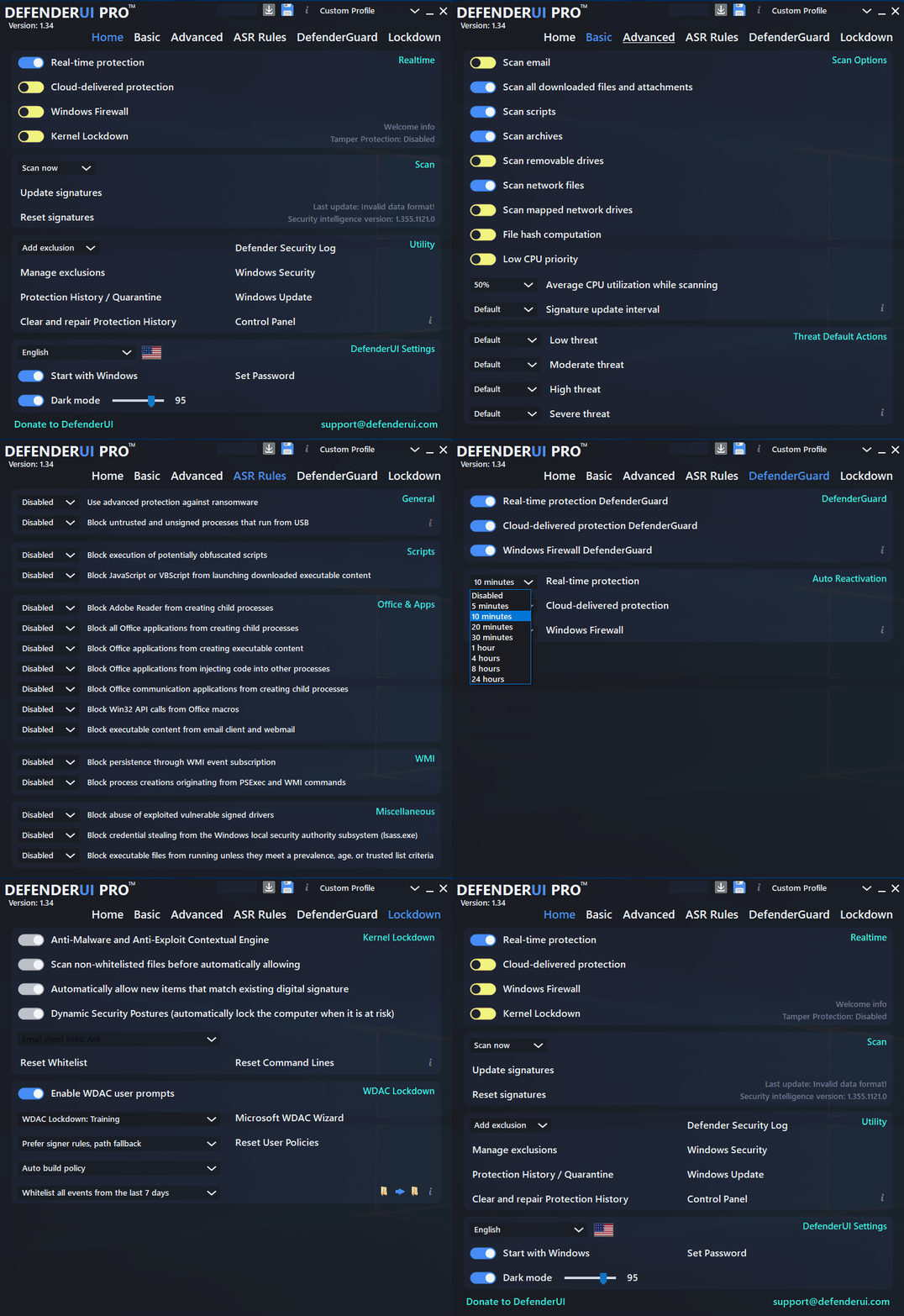
DefenderUI Free is usually just the right amount of protection for most users.But if you are serious about cybersecurity and locking down your systems, you might try DefenderUI Pro.
Features:
- DefenderUI significantly improves usability and unlocks many hidden security features of Windows Security in Windows 10 & 11.
- DefenderUI does a great job of allowing you to easily access parts of Windows Security that are typically hard to find and use.
- There are four main categories; real-time, Scan, Utility, and Settings. You can disable real-time protection, cloud protection, and Windows firewall.
- Through DefenderUI, you may access the Defender quarantine, examine the Windows Defender activity history, and open the security log files. With a single click, you may access Windows Security, Windows Update, and the Control Panel.Where DefenderUI shines is quick access to exclusions and logs.
- There are many other categories, including Basic, Advanced, ASR Rules, and DefenderGuard.
- Apart from real-time monitoring, DefenderUI also includes behavioral and PUA protection, both of which can be disabled if necessary. Additionally, a module specialized in ransomware protection is included, allowing for regulated folder access.
DefenderUI Pro includes all of the great features in DefenderUI Free, plus…
- Realtime user prompt to allow WDAC blocks
- WDAC Training Mode
- Auto whitelist WDAC audit event history
- Integrated customized Microsoft WDAC Wizard
- User customized policies
- Integrated Windows Sandbox to run untrusted files
- Email client links run in Windows Sandbox
- 139 blocked file types
- Integrated WhitelistCloud scan
- Completely free until 2025!
The app offers four distinct security profiles.
Overall, DefenderUI is a useful app that gives you complete control over Microsoft Defender’s security capabilities. It is simple to use, has many security profiles, and provides one-click access to both basic and advanced security settings. With its assistance, Microsoft Defender can be transformed from a background-running antivirus to a full-featured security application with numerous settings and features.

One thought on “DefenderUI Free / PRO 2.05”
thanks