

HandBrake is a tool for converting video from nearly any format to a selection of modern, widely supported codecs. Convert video from nearly any format and Free and Open Source. It was a must have if you are video mania 🙂
Features
Just a few of the reasons you’ll love HandBrake
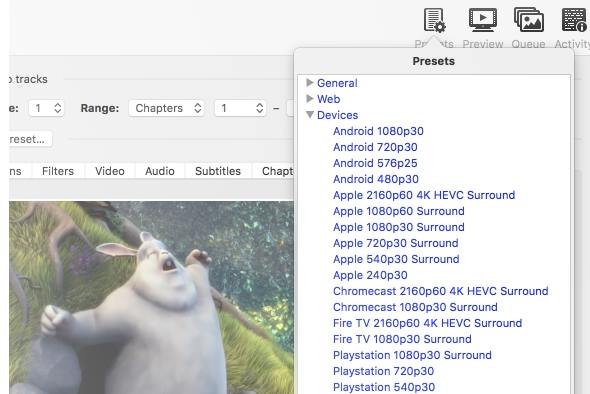
Built-in Device Presets
Get started with HandBrake in seconds by choosing a profile optimised for your device, or choose a universal profile for standard or high quality conversions. Simple, easy, fast. For those that want more choice, tweak many basic and advanced options to improve your encodes.
Supported Input Sources:
Handbrake can process most common multimedia files and any DVD or BluRay sources that do not contain any kind of copy protection.
Outputs:
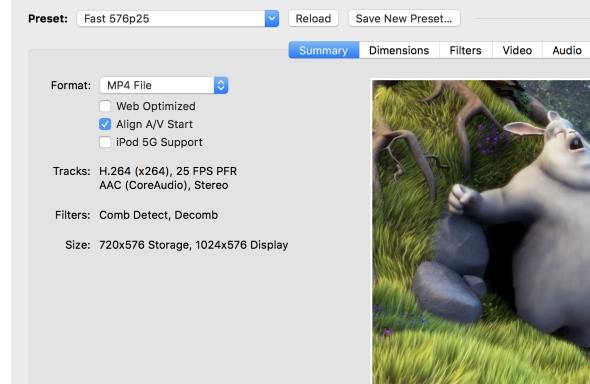
- File Containers: .MP4(.M4V) and .MKV
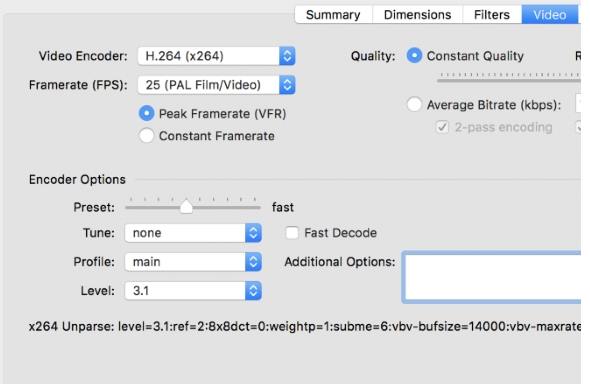
- Video Encoders: H.264(x264), H.265(x265) MPEG-4 and MPEG-2 (libav), VP8 (libvpx) and Theora(libtheora)
- Audio Encoders: AAC, CoreAudio AAC/HE-AAC (OS X Only), MP3, Flac, AC3, or Vorbis
- Audio Pass-thru: AC-3, DTS, DTS-HD, AAC and MP3 tracks
Even more features
- Title / Chapter selection
- Queue up multiple encodes
- Chapter Markers
- Subtitles (VobSub, Closed Captions CEA-608, SSA, SRT)
- Constant Quality or Average Bitrate Video Encoding
- Support for VFR, CFR and VFR
- Video Filters: Deinterlacing, Decomb, Denoise, Detelecine, Deblock, Grayscale, Cropping and scaling
- Live Video Preview
HandBrake 1.11.0
All platforms
General
- Added encoding to MOV container format
- Added AV1 VCN 2160p 4K preset
- For AMD 9000 series GPU hardware and newer
- Output dimensions may be incorrect on AMD 7000 series GPU hardware; this is unfixable in software
- Added Production DNxHR presets
- MOV container
- Any resolution video using HQX and SQ encoder presets
- 2160p, 1080p, and 540p resolution proxy (LB) presets
- 24-bit PCM multi-channel audio with pass through support
- Added Production ProRes presets
- MOV container
- Any resolution video using standard, HQ, and LT encoder presets
- 2160p, 1080p, and 540p resolution proxy presets
- 24-bit PCM multi-channel audio with pass through support
- Added Preservation FFV1 FLAC and PCM presets
- Same as Preservation FFV1 with single-codec audio
- Updated Preservation FFV1 preset to pass through all supported audio codecs
- Adds Apple Lossless, PCM, and Vorbis to pass through list
- Properly handle the case in which the first chapter timestamp is not zero
Video
- Added DNxHR encoder
- Added ProRes encoder
- Added AMD VCN AV1 10-bit encoder
- Added MPEG-2 profile and level selection
- Allowed muxing FFV1 in the MP4 container
- Improved AV1 in MP4 seeking on Apple software
- Dolby Vision profile 5 video is now tagged with a proper color tag
Audio
- Added PCM encoding and passthru
- Added support for custom channels order (#7265)
Build system
- Updated mingw-w64-build to version 11.0.0.
- Updated mac-toolchain-build script to version 2.15.0
Third-party libraries
- Updated libraries
- AMF 1.5.0 (AMD VCN video encoding)
- FFmpeg 8.0.1 (decoding and filters)
- HarfBuzz 12.2.0 (subtitles)
- Jansson 2.14.1 (JSON architecture)
- libbluray 1.4.0 (Blu-ray decoding)
- libdav1d 1.5.3 (AV1 decoding)
- libdvdnav 7.0.0 (DVD decoding)
- libdvdread 7.0.1 (DVD decoding)
- libjpeg-turbo 3.1.3 (preview image compression)
- liblzma (xz) 5.8.2 (LZMA video decoding, e.g. TIFF)
- libopus 1.6.1 (Opus audio encoding)
- libvpx 1.16.0 (VP8/VP9 video encoding)
- oneVPL 2.16.0 (Intel QSV video encoding/decoding)
- SVT-AV1 4.0.1 (AV1 video encoding)
- x265 r13309 (H.265/HEVC video encoding)
Linux
- Uses GtkFileLauncher to open files in sandboxed apps
- Added buttons to cycle through previews on summary page
- Added an option to change the UI display language
- Improved display of file sizes
- Fixed the disk space checks
- Fixed a crash that could happen when a preset category contains the ‘ character
- Updated existing and maintained locales
Mac
- Notifications sound is now played back when HandBrake is in the foreground
- File name labels in queue are now truncated in the middle, same behaviour as the Finder
- Minor miscellaneous fixes
- Updated existing and maintained locales
Windows
- The UI now requires Microsoft .NET Desktop Runtime 10.0.x. .NET 8 is no longer required
- Support for Intel HyperEncode has been removed as the feature is deprecated upstream
- Minor miscellaneous fixes
- Updated existing and maintained locales

One thought on “HandBrake 1.11.0”
well done man