

Core Temp is a compact, no fuss, small footprint, yet powerful program to monitor processor temperature and other vital information.
What makes Core Temp unique is the way it works. It is capable of displaying a temperature of each individual core of every processor in your system!
You can see temperature fluctuations in real time with varying workloads. Core Temp is also motherboard agnostic.
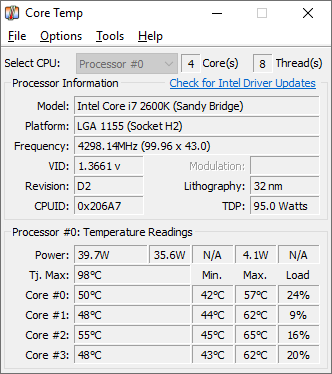
The uniqueness of it is that it shows the temperature of each individual core in each processor in your system! You can see in real time how the CPU temperature varies when you load your CPU. It’s also completely motherboard independent.
Intel and AMD recently published detailed, public information about the “DTS” (Digital Thermal Sensor), which provides much higher accuracy and more relevant temperature reading than the standard thermal diode sensors do.
This feature is supported on all Intel Core and Core 2 based processors as well as the whole AMD’s Athlon64 line of CPUs.
Note: AMD Phenom is supported, but it does not report absolute temperature.
Core Temp also has a logging feature, allowing a user to easily record the temperature of his processor(s) over any period of time, then the data can be easily transferred into an excel datasheet for easy graphing.
Core Temp works on Windows XP Service Pack 2, 2003 Server, Vista and Windows 7 (both 32bit and 64bit versions).
Thanks to CoolIT Systems for providing a digitally signed Core Temp driver which now works on all Vista and Windows 7 versions.
Version 1.20.1 – 2nd May, 2026
– Fix no core temps displayed or updated after reboot/sleep on Ryzen processors.
– Fix “Not responding” issue, during or after start of program.
– Fix TjMax reporting in Fahrenheit to shared memory and plugins.
Portable:
https://alcpu.com/CoreTemp/CoreTemp64.zip
https://alcpu.com/CoreTemp/CoreTemp32.zip
Setup: https://alcpu.com/CoreTemp/Core-Temp-setup-v1.20.1.150.exe
Language packs
[ Armenian | Bulgarian | Simplified Chinese | Traditional Chinese | Czech | Danish | Dutch | Finnish | French | German | Greek | Hebrew | Hungarian | Italian | Japanese | Korean | Norwegian | Polish | Portuguese | Romanian | Russian | Slovak | Spanish | Swedish | Turkish | Ukrainian | Vietnamese ]
[ Download the translation tool ]
