

Hydra is a free and open-source download manager written in Rust. It dynamically splits a file across multiple connections and across independent mirror sources, then keeps rebalancing that work while the download runs, so one slow server does not hold the whole transfer hostage. Hydra is a high-performance network file retriever designed for speed, resilience, and adaptability. It dynamically partitions downloads across multiple connections and independent mirror sources, continuously rebalancing work to maximize throughput without stalling on slow peers. It ships as both a wget/curl-compatible CLI and a cross-platform desktop download manager with browser integration.
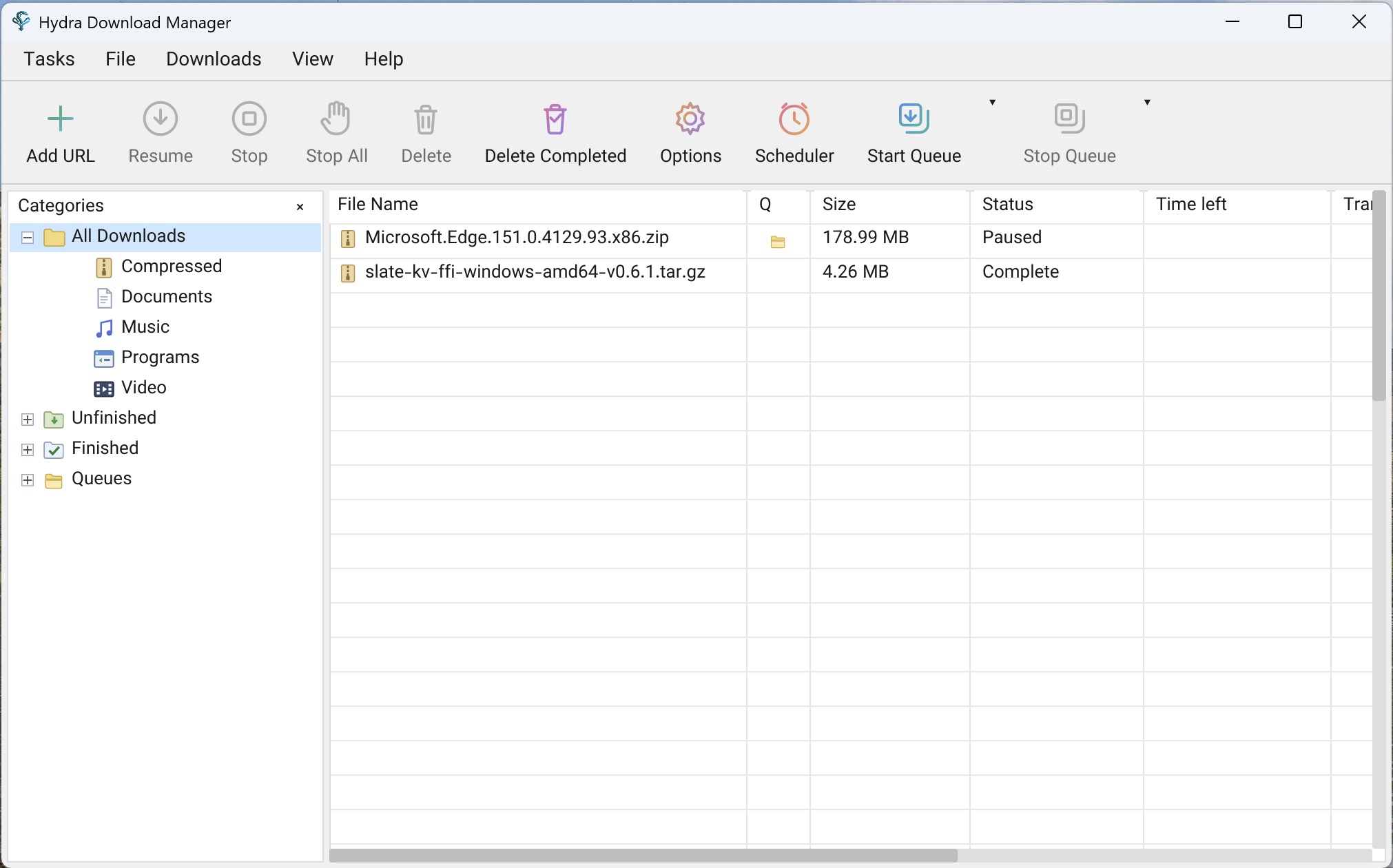
It ships in three shapes from the same engine:
- Desktop app — Windows, macOS and Linux, with categories, a queue and scheduler, tray icon, and browser integration.
- CLI — `wget` / `curl` compatible, with an interactive TUI queue manager.
- `libhydra` — the engine on its own as a C ABI shared library, for embedding in other applications (permissively licensed, separate from the GPL app).
Engine
- Adaptive concurrency — splits files across connections and mirrors, rebalancing live
- Range stealing — work is reassigned from slow peers to fast ones automatically
- Stall detection — statistical estimators catch degraded connections early
- HTTP(S), FTP, CONNECT tunnelling, SOCKS4/4a/5
- Integrity checks — checksum manifests plus Reed–Solomon bitrot protection
- Flat memory use — positioned writes keep RAM constant regardless of file size
Desktop app
- Browser integration for Chrome, Edge, Firefox and Safari — downloads are handed off automatically, plus right-click capture and media sniffing
- Queue and scheduler with start/stop times and retry tracking
- Tray icon, sounds, launch-on-startup
- Localized in 10 languages (ar, en, es, fa, fr, ja, ko, nl, ru, zh)
- In-app updater, including for installs in root-owned directories
CLI
- Drop-in `wget` / `curl` flag and dialect support (`hydra compat-link` installs the shims)
- Interactive TUI to manage, pause, resume and monitor the queue
- Content-based file type detection and auto-sort
- Remote checksum lookup — verify server-advertised digests before or after downloading
Requirements
- Windows — Windows 10 or later, x64 or ARM64
- macOS — macOS 11 or later, Intel or Apple Silicon
- Linux — x86_64 or aarch64; `.deb`, `.rpm` and portable tarballs provided
- Building from source needs Rust 1.80+
macOS note: the app is not notarized yet, so Gatekeeper may block it. If macOS
> says the app is damaged or from an unidentified developer, run: xattr -cr /Applications/Hydra\ Download\ Manager.app
What’s new in v1.1.0
- Extensible Plugin Runtime & Authoring SDK (
hydra-plugin,hydra-plugin-api,hydra-plugin-sdk,hydra-plugin-cli,hydra-gui,hydra-cli, packaging): - Added a sandboxed plugin runtime executing WebAssembly guests via Wasmtime with fuel metering, controlled child command execution, and host HTTP access.
- Added guest plugin SDK bindings and test harnesses for Rust, C, Go, Python, and Node.js.
- Added the
hydra-plugin-clideveloper tool with commands to scaffold (new), build, package (pack), and sign (sign).hyapluginbundles using Ed25519 and Minisign signatures. - Added the Plugins tab under Settings in the desktop app and interactive terminal management in the CLI, supporting plugin installation, configuration, inspection, and removal.
- Added system file associations and MIME type registrations (
application/x-hydra-plugin) for.hyapluginpackages across Windows, macOS, Linux, and Flatpak, enabling direct opening and installation from file managers and browsers. - Added shared online plugin catalog discovery with one-click installation, update checks, and direct web installation links.
- BitTorrent Downloads via Official Plugin (
hydra-torrent,hydra-plugin,hydra-gui,hydra-cli): - Added native BitTorrent downloading through the official
hydra-torrentplugin, supporting.torrentfiles andmagnet:links. - Added native component support in the plugin architecture, bundling supervised platform binaries for Windows (x86_64, ARM64), macOS (Apple Silicon, Intel), and Linux (x86_64, ARM64).
- Added torrent metadata inspection, multi-file and track selection in the Add URL dialog and CLI.
- Added live peer counts, seed counts, upload and download rates, and piece completion progress to progress windows and terminal output.
- YouTube & Media Stream Extraction (
hydra-youtube,hydra-gui,hydra-cli): - Added bundled official YouTube resolver plugin for extracting video streams, adaptive audio/video tracks, and playlist entries.
- Added stream and track selection choices in the Add URL dialog and interactive CLI prompts.
- Added batch queuing support for YouTube playlists directly into the download list.
- Settings Export and Import (
hydra-gui): - Added *File ▸ Export settings…* and *Import settings…*, saving and restoring application configuration as a portable, compressed
.hydatafile. - Preserved machine privacy and environment portability by stripping local secrets, passwords, window geometry, and browser extension authorizations, while remapping home directory paths to the importing user’s home (
~/...). - High-Concurrency Connection Limits up to 256 (
hydra-gui): - Added support for up to 256 connections per download and in per-server connection exceptions in the desktop app, expanding beyond the previous 32-connection limit.
- Move and Rename Incomplete Transfers (
hydra-gui): - Allowed moving and renaming paused, stopped, and incomplete downloads from the context menu and shortcut, relocating
.partstaging files and pinning chosen names. - Order by Addition in Download List (
hydra-gui): - Added “Order by addition” sorting to the downloads table and View menu, preserving the order items were added.
- Windows Package Manager Distribution (packaging):
- Added official Windows Package Manager (
winget install ja7ad.hydra) installation support and automated package submissions.
Changed & Refactored
- Default User-Agent (
hydra-gui): - Changed the default User-Agent for manually added downloads from generic
Mozilla/5.0to Internet Explorer 11 Trident (Mozilla/5.0 (Windows NT 6.1; Trident/7.0; rv:11.0) like Gecko), preventing generic web scraper blocks, and migrated saved configurations holding legacy defaults. - In-Page Media Dropdown Activation (browser extensions):
- Changed the browser extension media badge dropdown to open only on click instead of hover, preventing accidental popup triggers when moving the mouse or repositioning the badge.
- Desktop Shortcut Created by Default on Windows (packaging):
- Changed Windows GUI installations and the PowerShell install script (
install.ps1) to create a desktop shortcut by default (-Desktop:$falseskips it).
Fixed
- HTML Block Pages Intercepting Binary Downloads (
hydra-gui,hydra-net): - Fixed captive portals, firewalls, and login pages returning HTML responses in place of binary files: Hydra now detects HTML block pages, rejects overwriting destination files, clears invalid staging data, and reports an error instead of saving HTML as the target binary.
- Cross-Platform Filename Portability (
hydra-net,hydra-gui,hydra-cli): - Fixed invalid characters (
<,>,:,",|,?,*), control codes, trailing spaces/dots, and Windows reserved device names (CON,PRN,AUX,NUL,COM1-9,LPT1-9) across all platforms so downloaded files can be safely written to or moved across NTFS and FAT drives without OS errors. - Windows Drive Roots in Properties (
hydra-gui): - Fixed editing save locations to Windows drive roots (such as
Q:\file.zip) in the Properties dialog, preserving the root slash (Q:\) instead of stripping it to an invalid path (Q:), and kept drive letters out of display names. - Console Window Flashes on Windows (
hydra-gui,hydra-stream,hydra-plugin): - Fixed ffmpeg remuxing and plugin commands briefly flashing visible console windows on Windows by launching subprocesses with
CREATE_NO_WINDOW. - Startup Toggle in Portable Mode (
hydra-gui): - Fixed the “Launch Hydra on startup” setting being toggled in portable mode, disabling the option with an explanation to prevent portable instances from overwriting or hijacking the startup entry of an installed copy.
- Progress Dialog Minimum Dimensions (
hydra-gui): - Fixed the progress dialog collapsing below readable proportions by enforcing strict minimum window dimensions matching collapsed and detailed view states.
- Download Percentage in Paused State (
hydra-gui): - Fixed the status column omitting progress while paused, displaying the percentage completed alongside the paused state (e.g.
Paused (45.20%)) whenever file size is known. - macOS Window Restore from Dock (
hydra-gui): - Fixed clicking the Dock icon on macOS failing to reopen the main window when all windows were closed or minimized.
- Keyboard Layout and Platform Shortcut Handling (
hydra-gui): - Fixed keyboard shortcut matching on non-Latin keyboard layouts by mapping physical key positions, added modifier autocompletion in shortcut settings, and adapted primary modifiers (
cmdvsctrl) per platform. - Dark Theme Text Selection Contrast (
hydra-gui): - Fixed text input selection highlight in dark mode using light theme selection background, ensuring high contrast and readable text when selecting input fields.
- Linux AppImage Portability on Older Distributions (packaging):
- Fixed AppImage builds crashing on older Linux systems by building against Ubuntu 20.04 (glibc 2.31) and bundling missing
libxkbcommonlibraries. - Windows CLI Startup Stack Overflow (
hydra-cli): - Fixed command line interface crashing on Windows debug builds by reserving an 8 MiB stack size to accommodate deeply nested CLI command structures.
- Hostless Extension Authorization (
hydra-gui): - Fixed WebSocket connections from browser extensions lacking a native host being refused without prompting, allowing users to approve and remember trusted extension origins.
- Download List Sorting by Last Try Date (
hydra-gui): - Fixed table sorting by last try date failing to sort timestamps accurately.

One thought on “Hydra Download Manager 1.1.0”
New version 0.5.0 released