

Windows tuning utility for Blackwell GPUs.
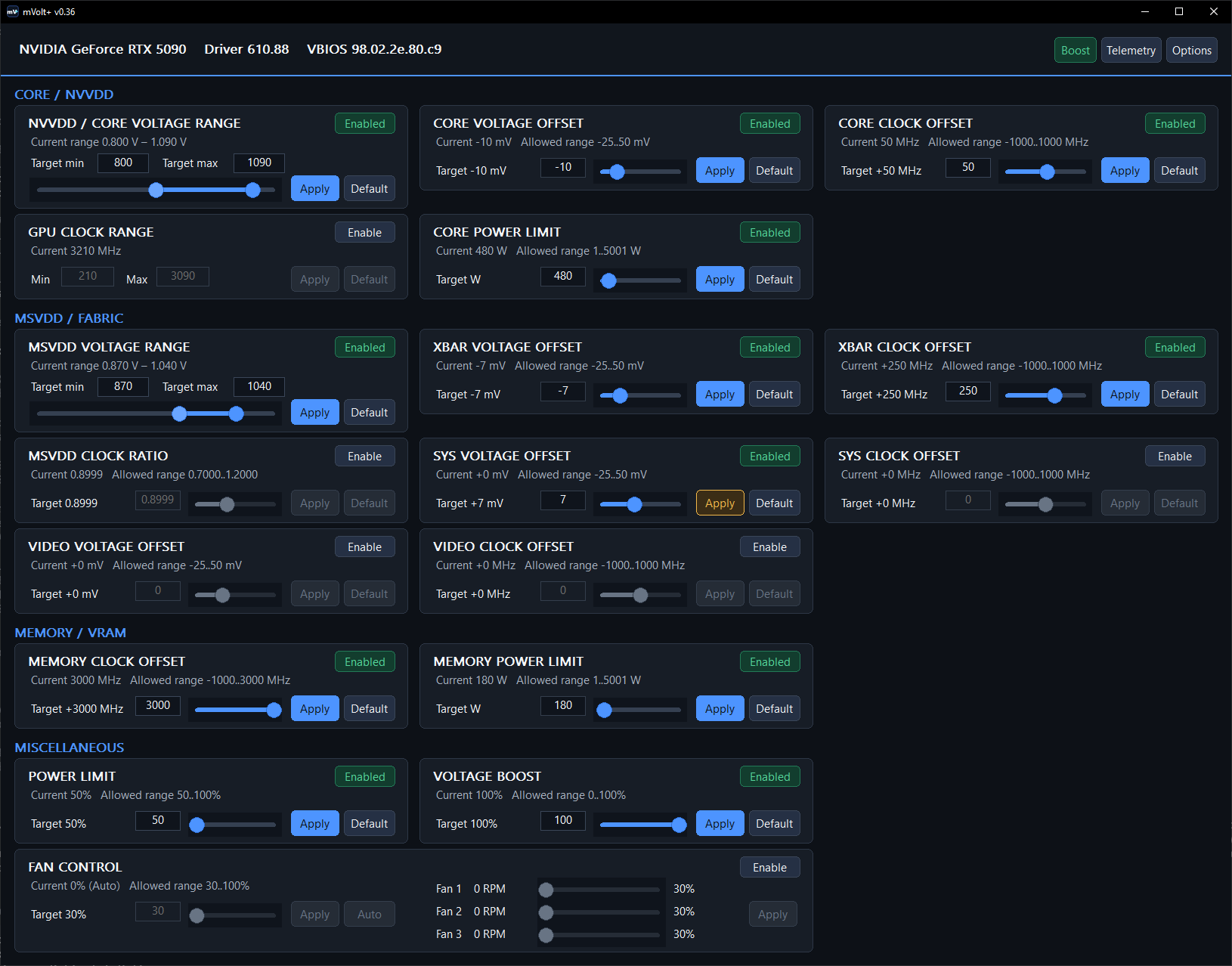
Features
- NVVDD and MSVDD minimum and maximum voltage control
- Core, XBAR, SYS and Video voltage offsets
- Core, Memory, SYS and Video clock offsets
- XBAR clock control with an adjustable MSVDD clock ratio that moves the XBAR, SYS and Video ceilings together
- Core and Memory channel power limits in watts, bounded by the range the vBIOS reports and held at the firmware default until unlocked in Options
- Board power limit and Voltage Boost
- GPU clock range through NVML locked clocks
- Linked and per-fan control with live RPM readback
- V/F curve editing with regional offsets and flattening
- Named tuning profiles covering every control, applied on demand or at Windows logon; a control the profile does not enable is left untouched
- Multi-GPU selection, with profiles and startup settings kept per adapter
- Live clock, rail, ADC, power and P-state telemetry in separate tabs
- Command line for every tuning control and for applying a profile by name;
--statusreports the driver’s own minimum and maximum for each control that has one - Adjustable poll interval, polling pause while hidden, and 50-200% interface zoom
Dashboard controls
Moving a slider only changes its pending target. Enable arms the control, Apply writes it, and Default restores the driver-reported default.
| Control | What it does |
|---|---|
| Core / NVVDD Voltage Range | Sets the core rail’s minimum voltage with the left handle and maximum voltage with the right handle; it does not lock a constant voltage. |
| MSVDD Voltage Range | Sets the separate MSVDD rail’s minimum and maximum voltage limits. |
| MSVDD Clock Ratio | Adjusts the MSVDD-domain clock ceiling relative to the core clock, affecting XBAR, SYS, and Video clocks; each still follows its own V/F curve and clock limits. |
| Core Clock Offset | Adds a global core-clock offset that stacks with regional V/F point offsets. |
| Memory Clock Offset | Adds an offset to the driver-exposed VRAM clock. |
| XBAR Clock Offset | Adds an offset to the GPU crossbar/interconnect clock. |
| Power Limit | Sets the board-power ceiling as a percentage of the firmware default. |
| SYS Clock Offset | Adds an offset to the GPU’s internal system clock domain. |
| Voltage Boost | Sets NVIDIA’s Voltage Boost percentage; it does not directly set a rail voltage. |
| Video Clock Offset | Adds an offset to the driver-exposed video clock domain. |
| Core / XBAR / SYS / Video Voltage Offset | Shifts how much voltage one domain asks for at a given frequency; negative allows a higher clock. |
| Core / Memory Power Limit | Sets an absolute watt limit on the core/graphics or memory/HBM power channel. Limited to the firmware default unless unlocked in Options. |
| GPU Clock Range | Sets an absolute minimum and maximum core clock; Default releases the lock. |
| Fan Control | The linked slider sets every fan; the per-fan sliders set individual channels, and Auto returns control to firmware. |
MSVDD Clock Ratio example: The nominal relationship is approximately clock ceiling = core clock x ratio. With the core at 3000 MHz, 0.90 corresponds to a 2700 MHz ceiling for XBAR, SYS, and Video clocks, while 1.20 corresponds to 3600 MHz. The ceiling moves as the core clock changes with GPU Boost; it does not force any domain to run at that exact frequency. Actual clocks can remain lower because each domain still follows its own V/F curve, offset, hardware limit, and workload-dependent boost behavior.
When mVolt+ closes, everything you applied stays on the card until you change it or reboot. Only the fans return to automatic, because a fixed duty with no program behind it stops responding to temperature.
Options > Extend voltage offsets opens the wider voltage-offset window for anyone who wants to go past the measured-safe default.
Options > Unlock Core/Memory power limits raises the ceiling on the two channel power sliders from the firmware default to the full range the vBIOS reports. It is off by default because those sliders reach 1 W at the bottom. Switching it back off returns any limit above the firmware default to the default, the same way turning off the XOC range or the extended voltage offsets does.
Compatibility
Tested on GeForce RTX 5090, RTX 5080, and RTX 5070 Ti.
