
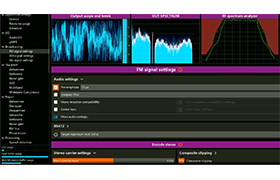
Stereo tool is a software-based audio processor which offers outstanding audio quality and comes with many unique features. It is used by over 1500 FM stations ranging from small local stations to 50-100 kW stations and nation-wide networks with dozens of transmitters, thousands of streaming stations and many DAB+, HD, AM and TV stations. It can be used for both live and file based processing.
If you don’t use Stereo Tool for FM processing, Basic suffices.
FM Standard offers “standard” FM processing, stereo and RDS encoding. The processing in this license is comparable to what many high end (00+) hardware boxes offer. In most markets, this license will make you one of the louder stations on the dial.
FM Professional adds our special Composite Clipper to the processing. This is the same clipper that’s in the Omnia.9sg and the Omnia.9 and Omnia.7 are being upgraded to it. The Composite Clipper takes the stereo pilot, stereo encoding and RDS into account when generating the composite MPX signal, which increases the headroom for audio by a lot. You can typically generate a signal that’s 2-3 dB louder without sounding more clipped, which results in a much more dynamic and much higher fidelity signal. Beside that it unlocks our “Asymmetric L-R” mode, which adds another 1 dB or so. Beside these advantages to the audio signal, the clipper can also analyse the RF spectrum after the exciter, and optimize the signal to reduce reception issues in fringe areas and in multipath areas.
If you can use Stereo Tool to generate the composite MPX signal, we highly recommend the FM Professional version, which sounds much better and improves your reception. To be clear, with FM Standard you’re not doing worse than most high end hardware boxes, but FM Professional really takes it to another level – assuming proper hardware you’ll be the loudest and cleanest station on the dial.
Declipper
Due to the so-called loudness war, where everyone wants their track to sound louder than any other track, nearly all music from the last 20 years or so has been clipped during mastering. This causes several issues:
- It sounds distorted
- It lacks dynamics
- Low bitrate codecs are using a lot of their bits to encode the distortion, leading to much more lossy compression (MP3, AAC, …) artifacts.
To make things worse, audio processing tends to boost softer sounds, in this case, the distortion, which worsens these problems. The Declipper repairs the audio before it enters the processor.
Our declipper is also used by police forensics labs. The following video shows what it does to clipped audio:
Delossifier
The Delossifier improves the sound of lossy compressed audio. It’s targeted at repairing low bitrate MP3 and MPEG2 files. Use this if your playlist contains low bitrate tracks. (But please, do everyone a favor and replace them…. With clipped audio that’s usually not possible, but low bitrate is a different story.
Advanced Dynamics
Advanced Dynamics was added in Stereo Tool version 8.50. It consists of 2 parts:
- Auto EQ
- Dynamic ratios
Auto EQ is the most spectacular part. It adjusts the sound before the AGC without compressing it. This makes it possible to have a much more consistent output without sounding processed. Since it doesn’t compress the audio, it doesn’t add density and doesn’t cause pumping or breating. Auto EQ can achieve the same spectral consistency that multiband compression can, without those side effects. It does not affect audio levels, only the spectrum.
Dynamic Ratios makes it possible to have a different ratio in the compressors depending on how much they are pushing the level down. When it gets deeper, it gets steeper. So a very loud sound will be compressed more.
This video shows the Auto EQ in action:
| 2026/09/07 | v11.05 (5.0.5) |
|
| 2026/09/06 | v11.05 (5.0.4) |
|
Special thanks to CallumCat (TSRh) keygen release and Blackrider (TSRh) Internet check patch release.
Registered Members only

2 thoughts on “Thimeo Stereo Tool 11.05”
thnks is stereotool 10.41 its ok thnks
link fixed..