
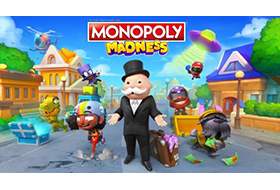
MONOPOLY®, in a way you’ve never seen before. With shorter rounds, race other players across the chaotic streets of Monopoly Town, collect resources, buy and upgrade properties, mess with your opponents, and avoid their tricks to win the race for riches. In this race for fame and fortune, the rules have changed slightly: This is Madness!. Key Fetures:No more board! Roam the streets of Monopoly Town to collect money, water, and electricity.20 NEW playable characters inspired by classic MONOPOLY® tokens.Discover 4 unique environments, each with several levels and…
Title: Monopoly Madness
Genre: Action, Casual
Developer: Engine Software, Ubisoft
Publisher: Ubisoft
Release Date: 22 Jun, 2023
About This Game
Rediscover the MONOPOLY® you love in a way you’ve never seen before. This is Madness!
System Requirements
Minimum:
Requires a 64-bit processor and operating systemOS: Windows 10 (64 bit only)Processor: Intel i3-6100 / AMD Ryzen 3 1200Memory: 8 GB RAMGraphics: NVidia GeForce GTX 950 / AMD Radeon RX 550DirectX: Version 11Storage: 6 GB available space
Recommended:
Requires a 64-bit processor and operating systemOS: Windows 10 (64 bit only)Processor: Intel i7-6700 / AMD Ryzen 5 1600Memory: 8 GB RAMGraphics: NVidia GeForce GTX 960 / AMD Radeon RX 460DirectX: Version 11Storage: 6 GB available space
1. Run “VBS.cmd” file with “Run as Administrator”. And pleas read the displayed information carefully before proceeding.
– Once complete, your PC will automatically restart.
– During the restart process, you will see a blue screen, you must press F7 and select “Disable Driver Signature Enforcement”.
2. Start game from “game\MonopolyMadness.exe” (with “Run as Administrator”).
3. Enjoy ;’)
=========
NOTE 1: After you are done playing the game, it is highly recommended to revert the changes by run “VBS.cmd” file, select “Revert” (by pressing key 3)
NOTE 2: Each time you start the game, you need to repeat all the steps above.
